

Inconvo is an agent builder designed for developers to add chat-with-data to their products.
Data agents built with Inconvo are somewhat unique in that they don’t directly generate SQL via an LLM. Instead, the model produces a structured intent that we validate against a semantic layer (definitions + constraints) before any SQL runs.
In this post, we’ll introduce the Inconvo Data Agent; we’ll cover the Data Agent’s architecture and show a step-by-step example.
We built the entire architecture around 3 values.
Don’t generate SQL directly from the model
We don’t rely on a probabilistic model to follow instructions perfectly. Instead, the model produces a parsable intermediate representation that we validate against the semantic layer on every request, before generating any SQL.
Make the semantic layer the source of truth
For the agent, the semantic layer (not the raw database) is the authority. It encodes business logic, permissions, and definitions so the agent operates within explicit constraints rather than “discovering” meaning from tables and columns.
Optimize for developer experience
Strong guardrails only matter if teams can adopt them quickly. We built well-designed APIs and SDKs that fit into the tools developers already use, so you can embed a chat-with-data agent in a few lines of code, without compromising safety or reliability.
Semantic layer
For Inconvo, the semantic layer is rulebook for how data can be accessed and the translation between how your business talks about data and how it’s stored.
It does two jobs:
That’s what we built and why. Next, we’ll break down how it works.
At a high level, an Inconvo agent does one thing: it turns questions about your product data into useful answers. When you connect your data, we introspect the schema and store a map of its structure. From there, you ask questions in plain English and the agent responds.
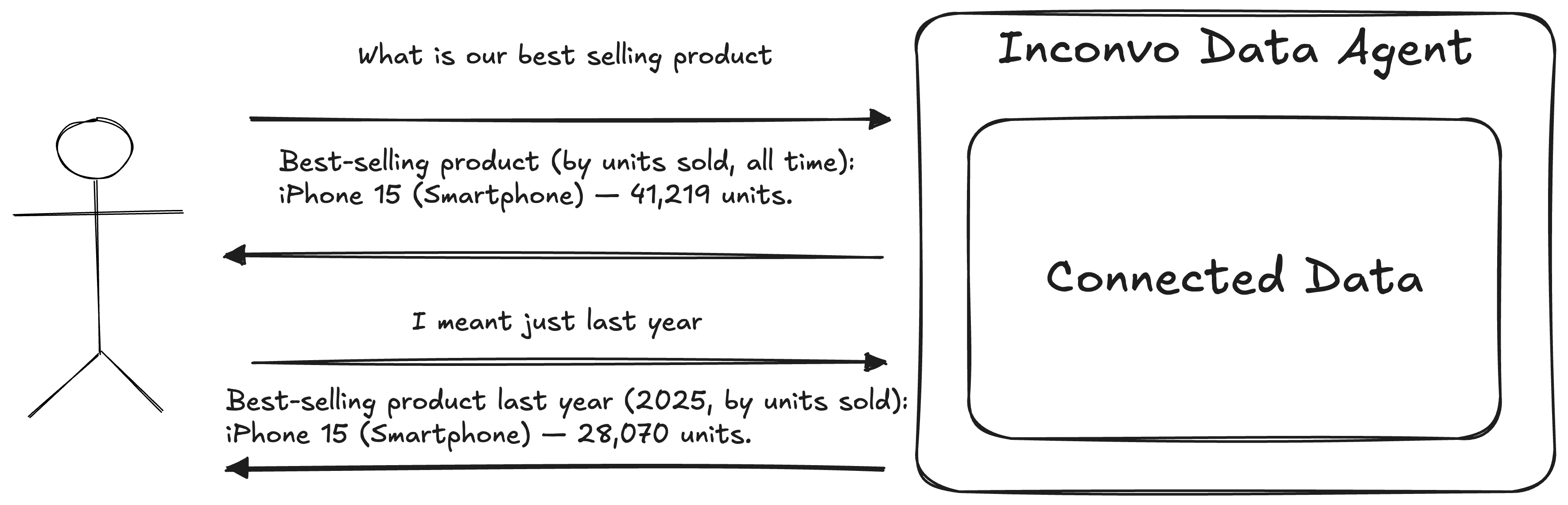
In real products, “who’s asking?” matters as much as “what are they asking?”. The same question should produce different results depending on the user’s organisation, role, or permissions. Inconvo handles this by scoping each conversation up front, so the agent can apply the right guardrails and context from the very first message.
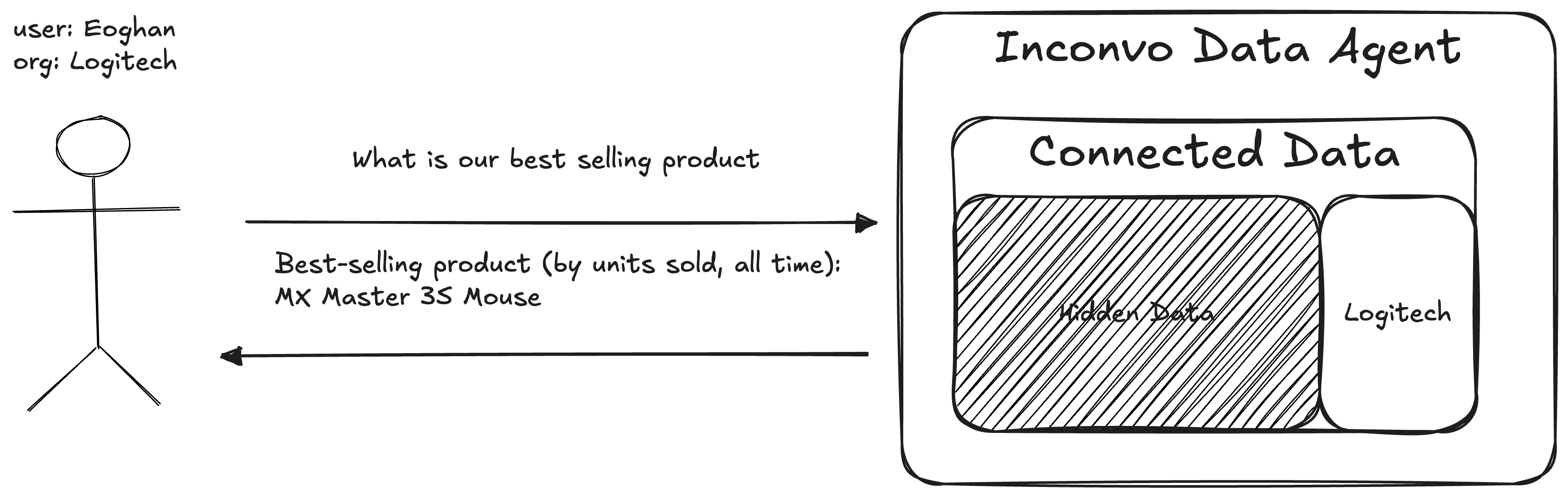
In practice, that just means passing a userIdentifier and userContext when you create the conversation:
const conversation = await inconvo.agents.conversations.create("agt_abc", {  userIdentifier: "user_xyz",  userContext: {    organisationId: 3,  },});
console.log(conversation.id); // convo_abcOnce the conversation exists, you chat with the agent like you would in any messaging interface. The API keeps context across turns, so you can refine questions, follow up, and iterate naturally.
const response1 = await inconvo.agents.conversations.response.create("convo_123", { agentId: "agt_abc", message: "What is our most popular product?",});const response2 = await inconvo.agents.conversations.response.create("convo_123", { agentId: "agt_abc", message: "I meant just last year",});We optimized for the three things people actually want from a data question: an explanation, a table, or a chart. Depending on the prompt, an Inconvo agent can respond with any of the three.
Here’s the shape of an Inconvo response:
type InconvoResponse = { id: string; conversationId: string; message: string; type: "text" | "chart" | "table"; chart?: { $schema: "https://vega.github.io/schema/vega-lite/v6.json"; }; table?: { head: string[]; body: string[][]; };};Charts come back as Vega-Lite specs — a concise, declarative JSON grammar that can express a wide range of analytical visuals. That also makes them easy to render in application front-ends.
Next: what actually happens when a message comes in, how it gets turned into a validated plan, and only then into SQL.
On each message, the API spins up a data-agent instance for that conversation. It is initialized with conversation metadata, including who is speaking and the scoped context, plus details about the connected data.
The key idea is that the agent does not answer in a single step. It can invoke internal tools as needed to plan the work, validate against the semantic layer, and assemble the final response.
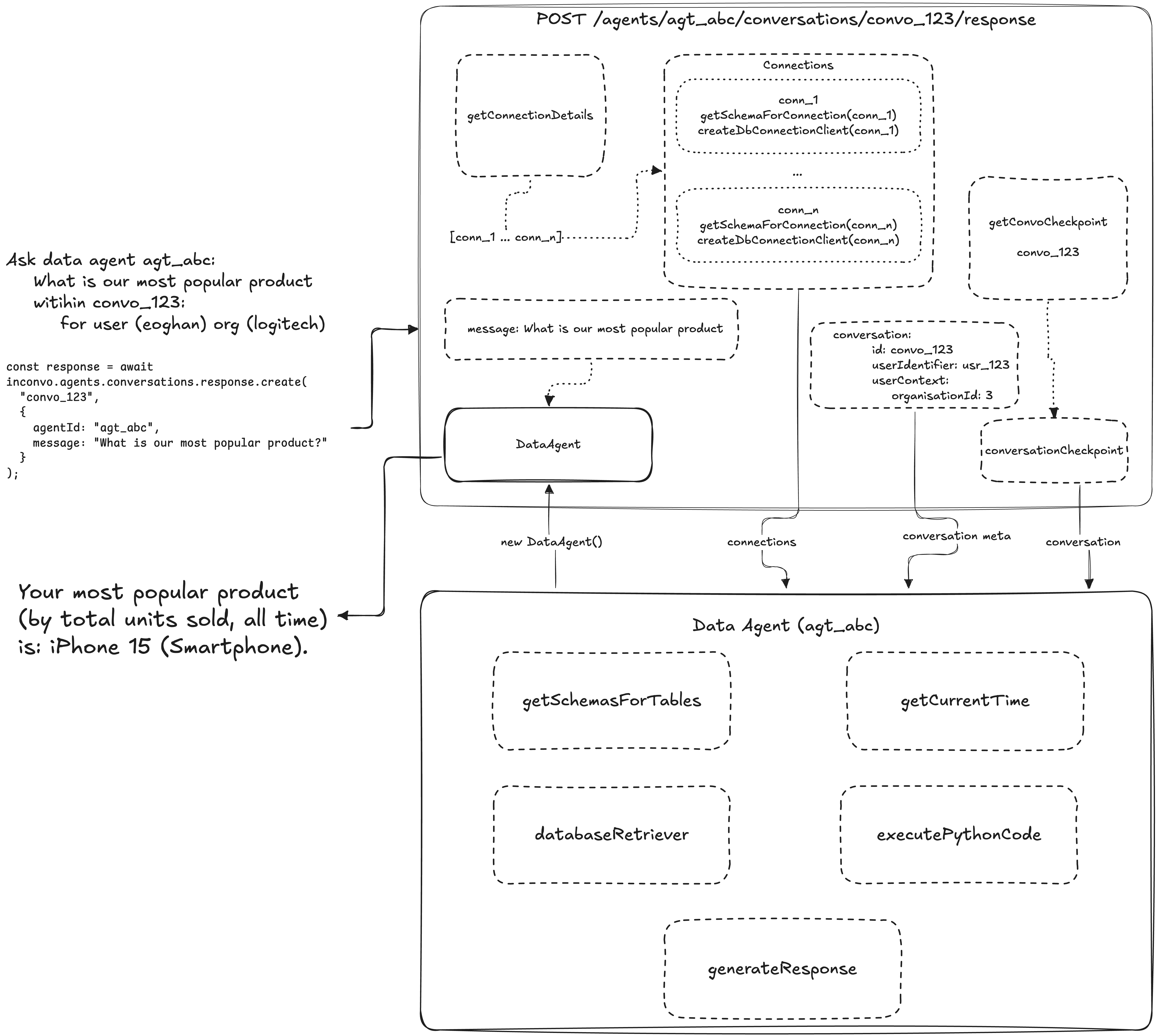
The most important tool is databaseRetriever, but it sits alongside a small set of utilities that keep the agent grounded. The design goal is simple: separate retrieval from reasoning and formatting, so the agent can only think over data it has explicitly been allowed to fetch.
getSchemasForTables: Returns formatted schema for specific tables so the model can understand structure before attempting any query.
Input:  tables:    - orders
Output: public.orders Access: Selectable Columns: - created_at (DateTime) - discount (number [$]) - Notes; Dollar amount subtracted from the cost of an order - id (number) - organisation_id (number) - product_id (number) - quantity (number) - subtotal (number [$]) - tax (number [$]) - user_id (number) - total (number [$]) Alias for:((subtotal - discount) + tax) Relations: - organisation (public.organisations) - product (public.products) - user (public.users) <ordersTableContext> Orders may also be referred to as items </ordersTableContext>getCurrentTime: Returns the current timestamp in ISO format so the model can answer relative-time questions, like “in the last few hours.”
executePythonCode: Runs Python in a sandbox for intermediate analysis. This is for exploration and multi-step reasoning, like transforming data frames or computing derived metrics.
generateResponse: Runs Python in a sandbox to assemble the final API response. This is where we format the output into the expected text, table, or chart shape.
A key constraint is that only databaseRetriever can fetch data. Both code generation tools operate purely on data frames returned by databaseRetriever, and cannot query the database directly.
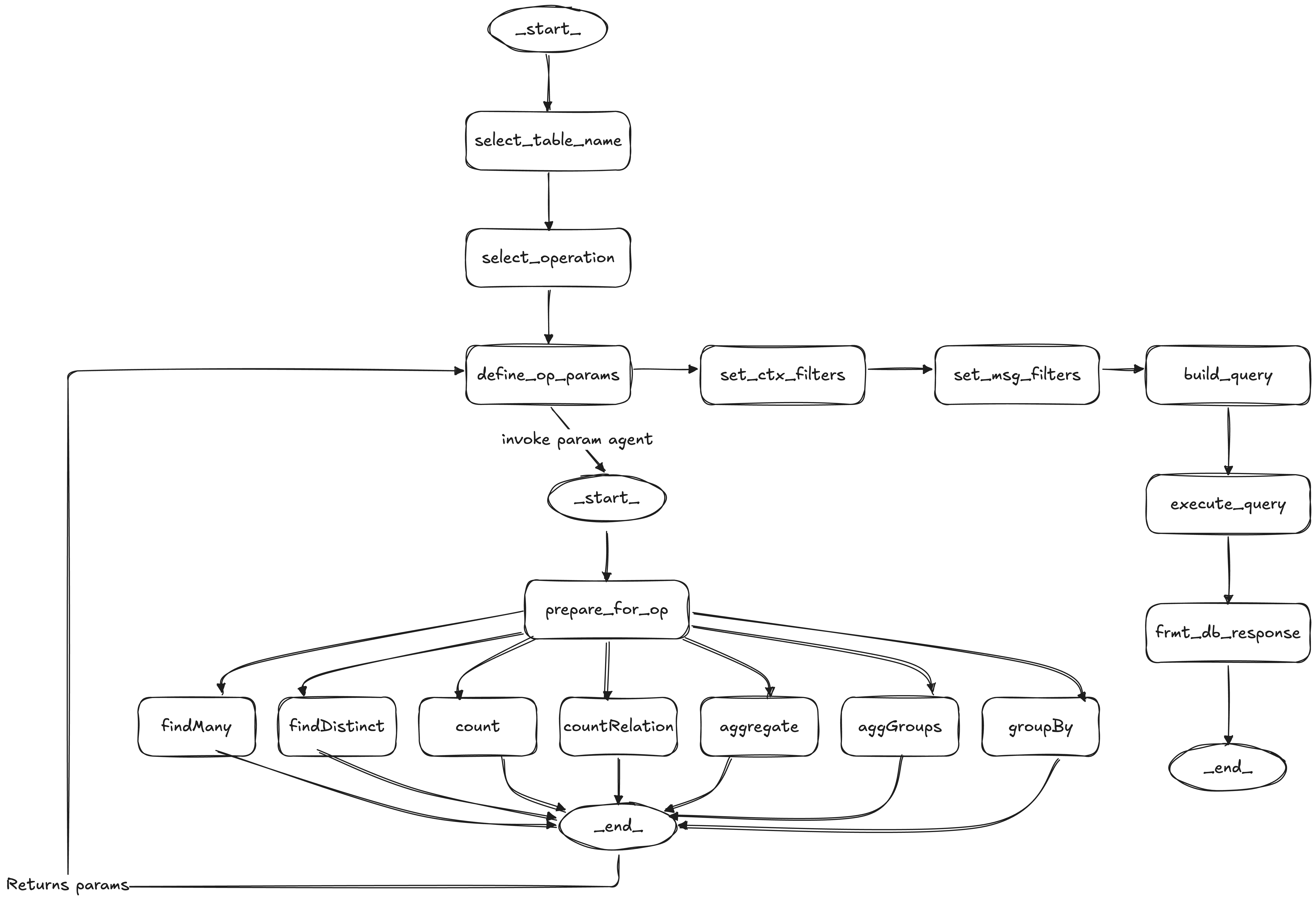
databaseRetriever is the only tool that can touch the database. It is not “text-to-SQL and run.” Before invoking the retriever, the dataAgent drafts a complete DatabaseRetrieverQueryDraft — choosing the table, operation, operation parameters, and question-derived filters. The retriever’s role is to validate that draft against the semantic layer, apply deterministic access control, and execute it.
That semantic layer is the contract the agent must follow.
The dataAgent drafts a complete DatabaseRetrieverQueryDraft before the retriever is invoked — it picks the table, operation, operation parameters, and question-derived filters. The retriever then validates that draft against the semantic layer and executes it:
resolve_tableQUERYABLE access.
validate_operationcountRelations requires at least one to-many relation).
validate_operation_parametersset_context_filtersuserContext fields to table columns, and this stage converts them into mandatory filters that are attached to every query.
validate_question_conditionsAND, so user prompts cannot bypass access control.
build_queryexecute_queryWhy not generate SQL directly? Two reasons: validation and meaning.
First, the operations produce an IL (intermediate language) query structure that we can validate with deterministic code before anything runs. Validating arbitrary SQL to the same standard would be significantly harder, and the guarantees would be weaker.
Second, the semantic layer lets us pass business meaning and access rules to the agent without forcing changes to the underlying database schema. That separation is important. It keeps governance and domain language close to the agent, and keeps your database free to evolve.
You can try to constrain raw SQL with pattern checks, but SQL has a huge surface area. It is easy for a model to produce a query that technically passes loose checks while doing something unintended. Restricting the model to a known set of operations means we know the shape of every query ahead of time. The model still has room to be flexible in how it fills the parameters, which is where LLMs are strong.
The two code-generation tools, executePythonCode and generateResponse, do not query data directly. They only operate on results that have already come back from databaseRetriever, accessed via the filesystem.
Whenever the inconvoAgent calls a tool, we route the tool response into one of three paths:
inconvoAgent loopformatResponseprocessDatabaseResultsWhen databaseRetriever runs, we take path (3) and call processDatabaseResults. That step:
We use code generation to transform intermediate data into the output shapes our API guarantees. The sandbox has access to altair so it can construct charts programmatically.
When we start the generateResponse sandbox, we bundle a Python helper with three functions: text, table, and chart. The model is instructed to call one of these to produce the final response in the expected shape.
If the sandbox output does not conform, we still validate deterministically outside the sandbox:
This section walks through a concrete end-to-end example, showing the full lifecycle from request to response in a multi-turn conversation with a data agent.

We connect an e-commerce database to an agent (agt_82dd40ea) and scope access using userContext.
{ organisationId: number }orders, products, reviews, and users
Each query includes a mandatory filter where organisation_id = userContext.organisationId.Then we create a conversation:
const conversation = await inconvo.agents.conversations.create("agt_82dd40ea", {  userIdentifier: "usr_6f1ed64s",  userContext: {    organisationId: 1,  },});
console.log(conversation.id); // convo_7a2bad9dBelow is a step-by-step trace of the request through the system, from message ingestion to retrieval to response formatting.
Input
Output
In this post, we shared how we approached designing a chat-with-data agent with guardrails to ensure safe and accurate retrieval of insights. We covered the agent’s internal tools, how it queries from databases and how it generates responses.
If this sparked ideas for integrating data agents into your own product, it’s worth giving Inconvo a try. The core source code lives in the open-source repo and we offer a cloud plan with a free tier. Feel free to share your feedback and feature requests. We’re excited to hear from you and to keep making data agents more accessible to everyone.